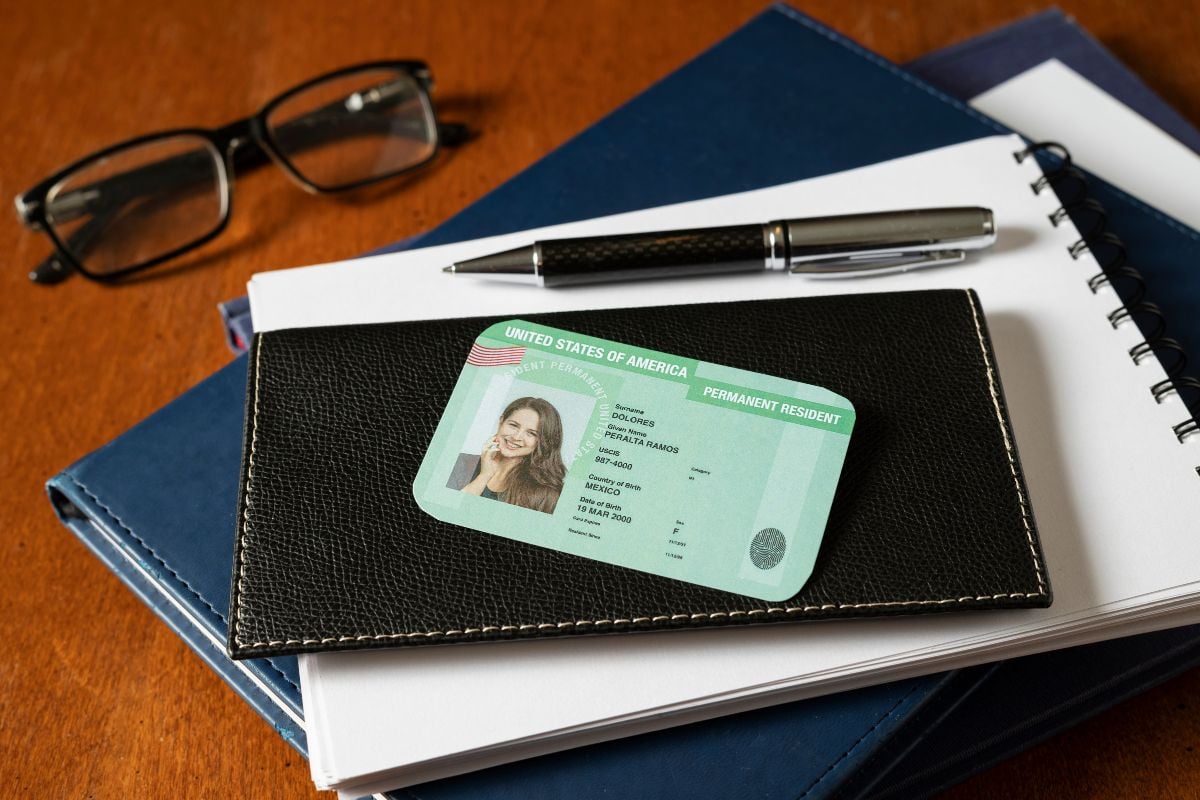
In 2026, trust is a technical failure.
Your most experienced KYC analyst can look at a high-fidelity Fake ID for 10 minutes and see nothing wrong, while an AI image detector can spot it in under 10 seconds.
By 2026, deepfakes have become so efficient that detecting them with the human eye is almost impossible, unless someone makes very obvious prompt mistakes.
In this environment, fake IDs are being created at scale, leading to financial loss, regulatory penalties, onboarding fraud, mule account creation, and reputational damage for businesses.
That’s why it’s necessary to use deepfake detection systems that are at least equally efficient.
In this blog, we’ll look at why fake IDs are dangerous, what methods fraudsters use to create them, what red flags to watch for, and how and when AI should be used for deepfake detection.
Давайте зануримося.
Основні висновки
- AI-generated IDs now look perfect to humans and specialized AI ID detection is now a mandatory requirement.
- A single verified Fake ID allows criminals to create clean accounts for money laundering and coordinated attacks.
- Hidden EXIF data, like “Edited in Photoshop” traces, is often the first red flag for manipulated ID detection.
- Total protection requires a deepfake detector for faces and an AI image detector for the entire document.
- Comparing a live selfie to the ID photo is the only way to stop stolen or borrowed identities.
What are Fake IDs?
A fake ID is any ID that’s been changed, made up, or used to pretend someone is who they’re not.
And no, we’re not just talking about those cheesy, badly laminated cards from the early 2000s. In 2026, manipulated ID detection is a challenge because today’s forgeries look incredibly real.
They have clean design, sharp print, and proper layouts. Some are so convincing that you wouldn’t catch them with the naked eye, making professional AI ID detection a necessity.
Більше ніколи не турбуйтеся про шахрайство зі штучним інтелектом. TruthScan Може допомогти тобі:
- Виявлення згенерованого ШІ зображення, текст, голос і відео.
- Уникайте велике шахрайство, кероване штучним інтелектом.
- Захистіть своє найдорожче чутливий активи підприємства.
The Most Common Types of Fake IDs
| Altered ID | A real ID where someone tweaks a detail—like changing the birthdate to look older. |
| Forged ID | A completely made-up ID built from scratch using digital design tools. |
| Borrowed or Stolen ID | A real ID used by someone other than the rightful owner |
| Synthetic Identity ID | A mix-and-match situation—real data from one person combined with fake details to create a brand-new identity. |
| AI-Generated ID | A fully fake ID created using generative AI. These often require a specialized AI image detector to spot, as some sites now sell realistic AI-made IDs for as little as $15. |
Why Fake IDs Threaten Enterprises
Let’s understand how fake IDs are a real threat to large companies.
For starters, there’s the compliance risk. If you’re in banking, crypto, insurance, healthcare, or even retail, you’re expected to follow strict KYC (Know Your Customer) and AML (Anti-Money Laundering) rules. When a fake document slips through your identity verification process, it puts your company in violation of federal law. That means fines, regulatory scrutiny, and in extreme cases, even losing your license to operate.
Then there’s the direct financial damage. AI-enabled deepfake fraud caused more than $200 million in losses in 2025 alone. In 2024, a Hong Kong company wired $25 million to a fraudster who used deepfake technology to pose as their CFO. That same year, AI-related scams were linked to $4.6 billion in cryptocurrency losses.
And it doesn’t stop at one transaction.
Fake ID verification → Clean Verified Account Status → Financial Exploitation & Illegal Activities (move money, launder funds, file fake claims, or run coordinated fraud campaigns)
In fact, a financial services firm in India uncovered an organized ring where multiple AI-generated identities were trying to onboard at the same time. Without robust AI ID detection, these payouts go straight out the door.
Insurance companies are feeling it too. Fraudsters are submitting AI-generated photos and fake ID documents to back up bogus claims, especially through online portals where there’s no face-to-face check. If the system isn’t strong enough to spot it, payouts go out the door.
How Fraudsters Manipulate ID Images
Fraudsters have different ways to manipulate ID images, such as:
- Face-swapping techniques
Instead of changing the name, date of birth, or ID number, the fraudster keeps all the original details as it is and replaces the photo.
They take a legitimate ID and swap out the real person’s face with their own (or sometimes with a completely AI-generated face). Because the underlying data is real, it often passes database checks.
Tools that can help in this are:
- DeepFaceLab
- FaceSwap
Приклад:
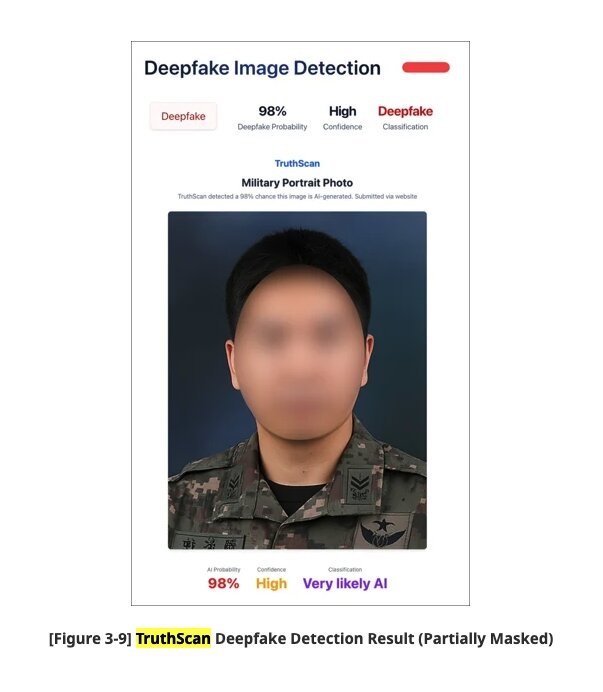
Researchers at Genians Security Center analyzed a fraudulent government employee ID where the photo had been digitally replaced.
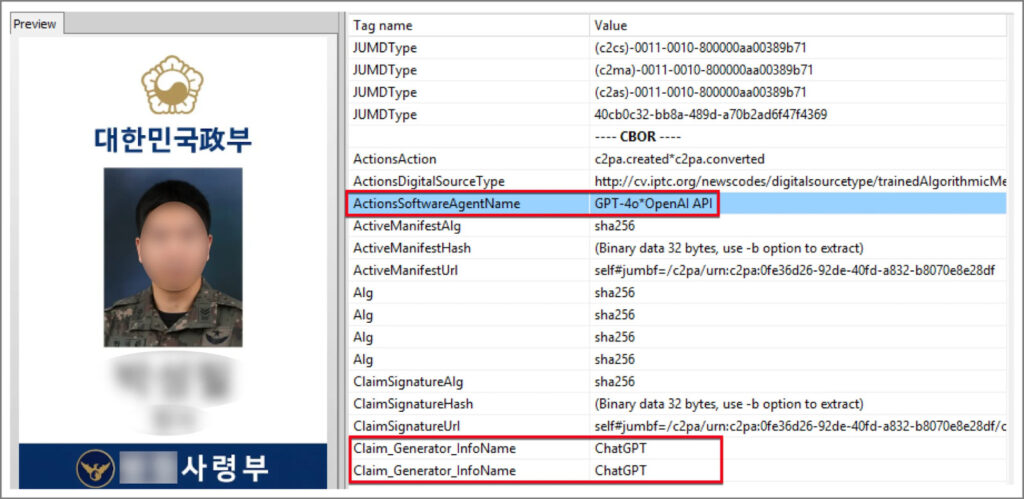
Human reviewers missed it entirely, but a deepfake detector flagged the inconsistencies that were invisible to the naked eye.
- Cropped or altered photos
This is the most common version of customer fraud: taking a real document and editing the parts needed.
This can be done using:
- Photoshop
- Open-source tools like GIMP
Приклад:
An underage user gets access to an older sibling’s real ID and replaces the photo with their own. Then they upload that image to pass online age checks for gambling platforms, alcohol delivery apps, or cannabis sites.
Barcode scans pass because the data belongs to a real person. Only advanced AI ID detection can spot the visual mismatch.
- Metadata tampering
Every digital image carries data which records when the photo was taken, what device captured it, GPS location, and what software touched the file.
Most people never see it, but it’s there. Fraudsters know this, so they try to manipulate it.
When someone edits a fake ID, the software leaves traces in the file’s EXIF data (Exchangeable Image File Format).
A real ID photo taken on a phone usually includes:
- Device model
- Timestamp
- Sometimes GPS coordinates
A manipulated file might:
- Have all metadata removed
- Show a creation date that doesn’t line up
- List “Photoshop” in the software field
That’s a red flag.
To avoid detection, fraudsters use tools like ExifTool or online EXIF editors to strip all metadata to create a “clean” file.
They can also copy metadata from a real image and paste it onto the fake, and change the “Date Modified” field to match the claimed ID issue date
Приклад:
A crypto exchange flags a passport upload because the metadata shows it was edited in Adobe Photoshop five minutes before submission.
The fraudster forgot to scrub the file data. Modern manipulated ID detection systems look for exactly this kind of mismatch.
Red Flags That Suggest a Fake ID
Here’s what usually gives a fake ID away:
Visual Red Flags
These are things you can spot just by looking closely.
- The photo looks off. It might have the wrong size, wrong placement, or different quality than the rest of the card.
- The face is blurry while the card is sharp (or the opposite).
- Lighting doesn’t match such as the face has shadows going one way, the card another.
- Edges around the face look cut-and-paste, sometimes with a faint “halo”.
- Fonts don’t match the state’s official style.
- Text spacing feels uneven or slightly misaligned.
- Holograms look flat, like they’re printed on top instead of embedded.
- Missing security features (ghost image, UV elements, laser perforations).
- Corners look perfectly digital instead of naturally rounded or worn.
Data Red Flags
Sometimes the card looks fine, but the numbers don’t add up.
- The barcode or magnetic stripe doesn’t match the printed details.
- The date of birth suggests 21, but the person clearly looks much younger.
- The expiration date format doesn’t match that state or country.
- ZIP code doesn’t line up with the listed city.
- ID number format doesn’t follow that state’s pattern.
Metadata & Digital Red Flags
- EXIF data shows editing software in the file history.
- The image creation date doesn’t match the age of the document.
- File size is unusual (too big can mean heavy editing; too small can mean compression from re-uploading).
- No metadata at all, which can be suspicious by itself.
- Strange compression marks around the photo or text areas, a key signal for manipulated ID detection.
Behavioral Red Flags During Onboarding
- The user submits multiple different IDs before one “works”.
- Several rapid attempts in the middle of the night.
- The selfie from a liveness check doesn’t match the ID photo.
- The user claims their camera is broken and uploads a saved image instead.
- Device location doesn’t match the ID’s issuing state or country.
Using AI to Detect Fake IDs
Today’s fake IDs aren’t sloppy. They’re built with AI tools designed to fool human eyes. A quick visual check isn’t enough.
That’s where AI ID detection comes in.
Instead of looking at just one thing, AI systems scan thousands of tiny signals at once such as pixel patterns, lighting behavior, facial structure, compression marks, metadata, and more.
- Детектор підробок
TruthScan’s Deepfake Detector focuses specifically on manipulated faces inside ID photos, selfies, and verification videos.
It studies the face at the pixel level, and checks:
- Whether lighting hits the skin naturally
- If skin texture stays consistent across the image
- Whether edges around the face show digital cut‑and‑paste artifacts
- If blinking and micro‑expressions look human
- Whether compression patterns match a real camera photo
Продуктивність
- 99%+ claimed accuracy across formats and manipulation types
- Detects face swaps made with tools like DeepFaceLab and FaceSwap
- Works in real time
- Supports major image and video formats (up to 4K)
- Continuously updated as new deepfake tools appear
Приклад
Researchers at Genians Security Center used TruthScan to flag a fake government employee ID. According to the Genians Security Center, TruthScan’s AI-image analysis was 98% accurate.
Companies plug TruthScan directly into their KYC systems through API integration.
Banks, for example, run live onboarding video through it. If a deepfake attempt shows up, the system flags it before the account is even created.
- ШІ-детектор зображень
While the Deepfake Detector focuses on faces, TruthScan’s AI Image Detector looks at the entire image.
It’s especially useful against IDs generated using tools like DALL-E, Midjourney, or Stable Diffusion.
It analyzes:
- Color patterns
- Texture consistency
- Shape irregularities
- Compression behavior
Then it compares those signals against millions of known real and AI-generated images.
Performance benchmarks
- 97.5% detection rate on Midjourney images
- 96.71% detection rate on DALL·E images
- Trained on a 2-million-image dataset (~95% benchmark accuracy)
- Updated to detect Nano Banana 2.5 (Google’s latest model, and one of the hardest to catch as of late 2025)
Uploaded images aren’t stored, which matters for regulated industries handling sensitive identity verification data.
Integrating Verification Into Onboarding Workflows
Stopping fake IDs has to happen before an account is created.
Here’s a to-the-point account fraud prevention approach:
- Ask for the ID at the start of onboarding. Don’t let users skip it.
- Get a live photo of the ID using the device camera. Add liveness prompts like tilt, blink, or slight movement. No uploads of old files.
- Scan the ID with AI for:
- Pixel edits
- Metadata anomalies
- Deepfake signs
- AI-generated elements
- Compare a live selfie to the ID photo. Flag mismatches for review.
- Use OCR to pull name, DOB, address, then verify against credit bureaus or government records.
- Confidence thresholds
- High confidence: Auto-approve
- Medium: Human review
- Low: Reject and log attempt
- Keep an audit trail of submissions, AI results, and reviewer decisions for compliance.
- Re-check identity for high-risk actions: large transactions, password resets, or account changes.
Best Approach for Enterprise ID Verification
The most effective enterprise identity verification strategy is multi-layered.
| Approach | Key Notes |
| Don’t rely on OCR or template matching alone | OCR reads text/barcodesTemplate matching checks layoutHigh-quality fakes can bypass theseMust combine with AI visual analysis. |
| Use document + biometric + database verification | Document: AI analysis of ID imageBiometric: Liveness detection + selfie matchDatabase: Verify extracted info against government/credit records |
| Layer behavioral signals | Monitor onboarding behavior: multiple submissions, rapid retries, odd submission times, device location mismatchesDetects fraud that document checks miss. |
| Continuously update models | Retrain AI as new generative models emerge. Example: TruthScan updated for Google’s Nano Banana 2.5. |
| Plan for compliance | Must be explainable, auditable, and bias-testedProduce forensic-grade reports with confidence scores and logs for EU AI Act, US KYC/AML, and other regulations. |
| Build incident response process | On fake ID detection: reject ID, log incident, preserve files and analysis, report to authorities (IC3, financial regulators), consult legal counsel. |
How TruthScan Protects Account Verification
TruthScan is an enterprise AI fraud detection platform built to stop AI-generated and manipulated identities before they turn into real accounts.
It protects 250M+ users and focuses on modern identity verification threats.
Below is a clear breakdown of what it delivers.
Core Capabilities for ID Verification
| Capability | What It Does |
| Pixel-Level Document Analysis | Scans ID images at the pixel level for edits, synthetic generation, lighting mismatches, compression artifacts |
| Digital Fingerprinting | Creates a unique fingerprint from image patterns, pixels, watermarks, and altered file data |
| Real-Time Results | Delivers verdicts in seconds with confidence scores and flagged signals |
| API Integration | Plugs directly into existing onboarding/KYC workflows |
TruthScan covers four major fraud surfaces:
- AI Image Detector → Flags fully AI-generated IDs and edited document images
- Deepfake Detector → Detects face-swapped or synthetic ID photos
- Voice Detector → Identifies AI-generated audio in voice verification
- Text Detector → Flags AI-generated supporting documents or chat submissions
Talk to TruthScan About Detecting Fake IDs Safely
Fake IDs aren’t a low-tech problem anymore.
TruthScan adds a real-time, API-ready layer of AI ID detection to your onboarding process. Every submitted ID gets analyzed at the pixel level looking for:
- Deepfake or face-swapped photos
- Fully AI-generated documents
- Metadata tampering
- Subtle photo edits and compression artifacts
All before a fraudulent account is approved.
Ready to tighten your identity verification workflow?
Visit TruthScan to schedule a demo or run a free analysis.
Protect your users. Protect your compliance standing. Protect your business before the next fake ID slips through.