Jantung saya berdegup kencang saat pertama kali muncul pop-up yang meminta saya untuk memverifikasi akun MetaMask. Saya tidak yakin apakah dompet MetaMask saya benar-benar membutuhkannya. Itu membingungkan dan, sejujurnya, sedikit menakutkan.
Siapa pun yang pernah ke sana tahu apa yang saya bicarakan. Simpul kecil keraguan di dalam perut Anda.
Seiring berjalannya waktu, saya mengetahui bahwa ada banyak informasi yang salah di luar sana dan bahwa sebagian besar permintaan KYC yang dilihat orang di MetaMask sebenarnya adalah penipuan.
Dalam blog ini, saya akan memandu Anda tentang apa itu verifikasi KYC MetaMask, cara membedakan permintaan asli dan palsu, dan cara menjaga dompet Anda tetap aman tanpa terjebak dalam trik phishing.
Hal-hal Penting yang Dapat Dipetik
- MetaMask tidak pernah meminta penggunanya untuk KYC. Setiap permintaan verifikasi yang Anda dapatkan kemungkinan besar adalah penipuan. Mengidentifikasi upaya-upaya phishing ini dapat menyelamatkan Anda dari banyak stres.
- Banyak orang mengira dompet kripto bekerja dengan cara yang sama seperti bursa, dan para penipu senang mengeksploitasi kesalahpahaman tersebut. Mereka mengirim email palsu dan pop-up yang terlihat resmi, dengan harapan Anda akan menyerahkan informasi sensitif.
- Permintaan verifikasi yang sebenarnya hanya datang dari platform resmi yang tepercaya, dan mereka akan tidak pernah meminta frasa seed atau kunci pribadi Anda.
- Agar tetap aman, biasakan menandai situs resmi, meninjau setiap transaksi dengan cermat, selalu memperbarui perangkat Anda, dan memeriksa tautan yang mencurigakan dengan alat seperti Detektor Penipuan Email TruthScan sebelum mengklik.
Apa Itu Verifikasi KYC MetaMask?
Izinkan saya menjelaskan sesuatu.
MetaMask itu sendiri melakukan tidak memerlukan verifikasi KYC. Saya tahu itu mungkin mengejutkan jika Anda pernah melihat pop-up atau email yang mengklaim bahwa Anda perlu “memverifikasi dompet Anda” segera.
Ketika saya pertama kali menemukan salah satu dari mereka, saya hampir mengklik tanpa berpikir panjang, dan melihat ke belakang, saya sedikit bergidik karena hampir saja saya terjebak dalam penipuan.
Jangan Pernah Khawatir Tentang Penipuan AI Lagi. TruthScan Dapat Membantu Anda:
- Mendeteksi AI yang dihasilkan gambar, teks, suara, dan video.
- Hindari penipuan besar yang digerakkan oleh AI.
- Lindungi sebagian besar sensitif aset perusahaan.
Sebenarnya, MetaMask adalah dompet non-kustodian. Ini pada dasarnya berarti Anda mengontrol kripto Anda sendiri.
Tidak ada perantara yang meminta kartu identitas, paspor, atau swafoto dengan kartu kredit Anda.
Dompet Anda sepenuhnya milik Anda, dan verifikasi KYC bukan bagian dari pengaturan itu.
Satu-satunya waktu Anda akan menemukan KYC adalah jika Anda menggunakan MetaMask untuk terhubung ke layanan terpusat, seperti bursa, yang secara hukum harus memeriksa siapa Anda. Tetapi itu adalah bursa, bukan MetaMask.
Kebingungan biasanya berasal dari fakta bahwa orang mendengar tentang KYC dalam kripto di tempat lain (di bursa, platform pinjaman, atau pasar NFT).
Jadi, ketika mereka melihat prompt MetaMask yang terlihat resmi, mudah untuk menganggapnya nyata. (Pernah ke sana, pernah melakukan itu!)
Ingatlah, jika Anda hanya menggunakan MetaMask untuk menyimpan atau mengirim kripto, Anda hampir tidak perlu mengirimkan ID.
Mengapa Orang Berpikir MetaMask Membutuhkan KYC
Ketika saya pertama kali mulai menggunakan MetaMask, saya berasumsi bahwa dompet pada dasarnya sama dengan bursa.
Pernahkah Anda membeli kripto di Coinbase atau Binance? Jika ya, Anda pasti tahu bagaimana cara kerja KYC di sana.
Mereka meminta kartu identitas, swafoto, bahkan terkadang bukti alamat. Menerima pemberitahuan serupa dari MetaMask bisa mengelabui orang untuk percaya bahwa itu sah.
Informasi yang salah yang beredar secara online adalah penyebab lain dari kebingungan ini. Saya telah melihat forum, media sosial, dan bahkan beberapa artikel dengan santai menggunakan “MetaMask KYC” atau “Diperlukan verifikasi MetaMask.”
Mereka harus menjelaskan bahwa ini adalah penipuan.
Para penipu tahu bahwa orang-orang menganggap dompet berfungsi seperti halnya bursa.
Mereka menggunakan AI untuk mendesain pop-up palsu, email phishing, dan situs web yang terlihat hampir sama dengan yang asli. Beberapa di antaranya bahkan menyertakan alamat dompet Anda dalam pesan untuk membuatnya terasa resmi.
Rumor ini menyebar karena orang-orang mencampuradukkan dompet penyimpanan mandiri dengan layanan terpusat. Para penipu mengandalkan kekeliruan tersebut, dan mereka sangat ahli dalam hal ini.
Setelah Anda memahami hal ini, menemukan permintaan verifikasi palsu menjadi jauh lebih mudah.
Bagaimana Permintaan Palsu “Tingkatkan Dompet Anda” Atau “Verifikasi Akun Anda” Memanfaatkan Harapan Itu
Para penipu tahu bahwa banyak dari kita yang panik saat melihat pesan tentang verifikasi atau peningkatan dompet.
Saya pernah melihat pesan yang mengatakan hal-hal seperti, “Akun MetaMask Anda akan terkunci dalam 24 jam jika Anda tidak melakukan verifikasi,” dan mudah sekali untuk panik.
Dan petunjuk ini meniru bahasa dan desain yang tepat seperti yang Anda harapkan dari MetaMask. Logo, tombol, dan bahkan peringatan tentang “pembaruan keamanan” membuatnya tampak sah.
Satu-satunya perbedaan adalah jika Anda mengkliknya, mereka tidak meminta login normal.
Mereka meminta kunci pribadi Anda, frase benih, atau informasi pribadi. Dan setelah Anda menyerahkannya, kripto Anda pada dasarnya hilang.
Seperti yang telah disebutkan di atas, saya mengetahui sejak awal bahwa para penipu mengandalkan satu asumsi, yaitu pengguna secara otomatis menautkan “dompet” dengan “pertukaran yang memerlukan KYC.”
Mereka mengandalkan Anda untuk tidak mempertanyakan perintah tersebut, karena sudah terasa familiar.
Sebagai gambaran, permintaan palsu ini bisa datang dalam berbagai cara, seperti pop-up peramban, email, dan bahkan obrolan dukungan palsu.
Beberapa di antaranya cukup meyakinkan sehingga saya harus membandingkannya secara berdampingan dengan halaman resmi MetaMask hanya untuk merasa aman.
A pengguna di Reddit berbagi email yang serupa:
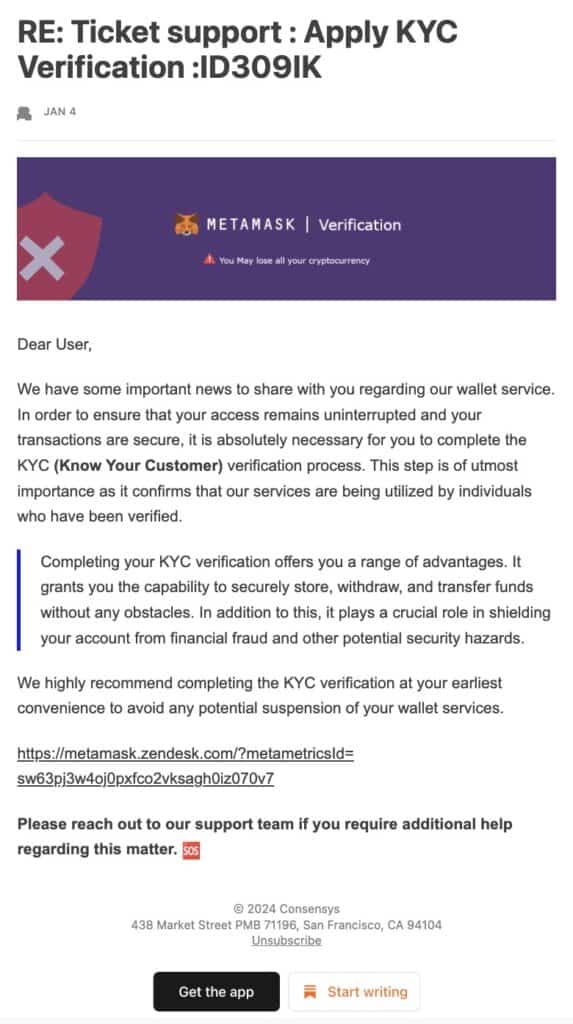
Siapa pun yang memiliki kesadaran akan hal ini mungkin akan berpikir dua kali sebelum terjebak dalam email semacam itu. Namun, mereka yang tidak tahu akan langsung jatuh ke dalam perangkap.
Saya punya sedikit informasi yang bisa membuat semuanya menjadi lebih jelas. TruthScan Detektor Penipuan Email dapat membantu Anda memeriksa apakah tautan, email, atau perintah aman sebelum Anda mengekliknya.
Saya mulai menggunakannya setelah pertemuan pertama saya yang menakutkan, dan ini telah menyelamatkan saya dari banyak upaya verifikasi palsu.
Cara Mengenali Permintaan KYC yang Sah vs Palsu di MetaMask
Pertama kali Anda mencoba mencari tahu apakah permintaan KYC di MetaMask itu nyata atau tidak, bisa terasa seperti berjalan di ladang ranjau.
Tetapi saya telah mempelajari beberapa pola yang membuatnya lebih mudah untuk membedakannya.
Permintaan yang Sah (Seperti Apa Bentuknya)
Pada kenyataannya, MetaMask sendiri jarang meminta KYC. Ini hanya dilakukan ketika Anda menghubungkan dompet Anda ke bursa terpusat atau layanan kustodian karena mereka secara hukum memerlukan verifikasi.
Ketika itu terjadi:
- Permintaan berasal dari situs web resmi atau aplikasi terverifikasi.
- Anda tidak akan pernah dimintai frasa seed atau kunci pribadi Anda.
- Segala bentuk formulir yang meminta informasi pribadi adalah bagian dari bursa atau platform yang sudah Anda percayai.
Skema KYC Palsu dan Tanda Bahaya Umum
Sekarang untuk hal-hal yang membuat orang mendapat masalah, yaitu petunjuk palsu.
Ini bisa terlihat sangat meyakinkan, tetapi Anda harus memperhatikan beberapa hal.
- Pop-up atau email yang mengklaim bahwa dompet Anda akan segera dikunci jika Anda tidak melakukan verifikasi.
- Permintaan untuk frasa seed, kunci privat, atau frasa pemulihan rahasia Anda.
- Tautan yang tidak mengarah ke MetaMask resmi atau domain pertukaran.
- Email dengan kesalahan pengejaan, sapaan umum, atau urgensi yang tidak biasa. (Penipu benar-benar perlu meningkatkan keterampilan menulis mereka!)
Para penipu mengandalkan kepanikan dan kebingungan. Ketika Anda berhenti sejenak dan mencari tanda bahaya ini, permintaan palsu akan lebih mudah dikenali.
Tabel di bawah ini akan membantu Anda memahami informasi ini dengan mudah:
| Fitur | Permintaan MetaMask / Pertukaran yang sah | Permintaan KYC Palsu |
| Sumber | Situs web resmi atau aplikasi terverifikasi | Email acak atau pop-up |
| Info yang diminta | Hanya apa yang dibutuhkan platform secara hukum (jangan pernah menggunakan frasa seed atau kunci pribadi) | Frasa benih, kunci pribadi, atau data pribadi |
| Urgensi | Pemberitahuan normal | Pesan yang mengancam dan sensitif terhadap waktu |
| Tautan | Langsung ke domain terverifikasi | URL aneh atau tautan yang dipersingkat |
| Pencitraan merek | Cocok dengan gaya platform | Terkadang terlihat nyata, tetapi perbedaannya tidak kentara |
Sebelum mengklik apa pun, selalu pindai tautan melalui Detektor Penipuan Email TruthScan.
Apa yang Harus Dilakukan Jika Anda Diminta untuk Menyelesaikan KYC di MetaMask
Jika Anda tidak tahu apa itu permintaan verifikasi KYC MetaMask, rasa ingin tahu Anda kemungkinan besar akan mengalahkan Anda.
Tapi inilah yang saya rekomendasikan kepada siapa pun yang melihat permintaan seperti itu:
- Berhenti dan Bernapaslah
Jangan langsung mengklik apa pun. Sangat mudah untuk panik ketika Anda melihat peringatan bahwa dompet Anda “terkunci” atau “ditangguhkan”, tetapi para penipu mengandalkan tekanan tersebut. Berhentilah sejenak dan pikirkan terlebih dahulu.
- Periksa Sumbernya
Apakah perintah tersebut berasal dari situs web atau aplikasi resmi? Jika berupa pop-up di browser atau email, kemungkinan besar itu palsu.
- Jangan Pernah Membagikan Frasa Benih Anda
MetaMask tidak akan pernah meminta frasa seed Anda untuk “memverifikasi” akun Anda. Jika ada permintaan untuk itu, itu adalah tanda bahaya. Setelah seseorang memiliki seed phrase Anda, mereka dapat mengambil semua yang ada di dompet Anda.
- Laporkan Permintaan yang Mencurigakan
Jika Anda menemukan permintaan KYC yang mencurigakan, laporkan ke MetaMask atau platform yang ditiru. Membantu menghentikan penipu akan melindungi semua orang di komunitas.
Mengapa MetaMask Tidak Membutuhkan KYC untuk Sebagian Besar Pengguna Dompet
Alasan mengapa Anda jarang membutuhkan KYC untuk MetaMask adalah karena cara kerja dompet ini. MetaMask menyebut dirinya sebagai dompet non-kustodian atau penyimpanan mandiri, yang berarti Anda adalah satu-satunya orang yang mengendalikan dana Anda.
Itulah semua perbedaan yang perlu Anda ketahui untuk memahami apa itu verifikasi KYC MetaMask.
Ini berbeda dengan bursa, yang harus mengikuti peraturan pemerintah dan mengumpulkan identifikasi.
MetaMask tidak menyimpan uang Anda untuk Anda. Ini hanya memberi Anda kunci untuk mengaksesnya.
Dengan demikian, tidak ada alasan hukum untuk memverifikasi identitas Anda, dan tidak ada pop-up atau email yang akan membuat Anda merasa seperti itu.
Risiko Nyata jika Anda Mengikuti Permintaan KYC Palsu
Saya tidak bisa cukup menekankan hal ini... terjebak dalam permintaan KYC palsu mungkin terasa tidak berbahaya pada awalnya, tetapi dapat menyebabkan masalah serius.
- Kripto Anda Dapat Dicuri Seketika
Saat Anda membagikan seed phrase atau private key Anda, para penipu dapat mengosongkan dompet Anda dalam hitungan menit. Tidak ada cara untuk membatalkan transaksi di blockchain.
Percayalah, saya pernah melihat kepanikan terjadi saat seseorang menyadari bahwa dana mereka hilang. Ini brutal.
- Pencurian Identitas
Membagikan ID, alamat, atau foto selfie Anda kepada para penipu ini dapat mengakibatkan pencurian identitas.
Mereka dapat membuka rekening atas nama Anda, melakukan penipuan, atau melakukan hal-hal lain yang dapat membahayakan seluruh identitas Anda.
- Phishing di Akun Lain
Penyerang terkadang bisa mendapatkan akses ke semua dompet atau platform Anda setelah Anda mengklik satu tautan berbahaya. Hal ini dapat menyebabkan beberapa kompromi hanya dengan satu kesalahan kecil.
Praktik Terbaik untuk Tetap Aman Saat Menggunakan MetaMask
MetaMask sebagian besar aman, tetapi beberapa kebiasaan dapat membuatnya lebih aman.
- Tandai Situs Resmi
Selalu buka langsung situs web resmi MetaMask atau platform terverifikasi yang Anda gunakan. Meskipun tautan yang diterima terlihat sangat meyakinkan, ketikkan sendiri URL-nya atau gunakan bookmark Anda.
- Mengamankan Perangkat Anda
Ponsel dan komputer Anda harus memiliki patch keamanan terbaru dan perangkat lunak antivirus. Penipu dapat dengan cepat menyelinap masuk ke dalam perangkat yang disusupi meskipun Anda tidak pernah mengeklik tautan yang mencurigakan,
- Gunakan Email Terpisah untuk Kripto
Buatlah alamat email terpisah untuk semua akun yang berhubungan dengan kripto. Upaya kecil ini dapat membuat email Anda langsung terlihat berbeda jika terjadi upaya phishing dan penargetan spam.
- Tetap Terupdate tentang Penipuan
Dunia kripto berkembang dengan cepat, begitu juga dengan penipuan. Biasakan untuk membaca berita terbaru dari sumber dan komunitas tepercaya, sehingga Anda tahu apa yang harus diwaspadai.
TruthScan Detektor Penipuan Email dan Detektor Gambar AI juga dapat menyelamatkan Anda dari beberapa situasi yang mengganggu.
Kesimpulan
Saya memahami betapa mudahnya lengah dengan permintaan KYC palsu di MetaMask.
Tetapi memahami apa itu verifikasi KYC MetaMask, bagaimana cara kerjanya, dan seperti apa permintaan yang sah dapat membuat perbedaan.
Yang benar adalah, MetaMask tidak memerlukan KYC untuk sebagian besar pengguna, jadi sebagian besar permintaan yang Anda lihat adalah penipuan.
Tetapi jika Anda masih perlu memastikannya, Detektor Penipuan Email TruthScan adalah platform yang hebat. Platform ini dapat melindungi kripto, informasi pribadi, dan ketenangan pikiran Anda.
Identifikasi email penipuan dalam hitungan detik dengan TruthScan.