Once you start running a business, you will encounter criminals who want to take advantage of your growth by using fake documents.
With the rise of advanced generative tools, it has become easier than ever for bad actors to churn out fake images to test your defenses daily. You simply cannot rely on a gut feeling to spot identity theft anymore.
Every single day, thousands of businesses lose money because they assume a clean-looking photo is legitimate.
According to the 2025 Identity Fraud by Numbers report from Regula, identity fraud continues to escalate, with individual victim losses reported to the IC3 growing to a record $16.6 billion in 2024—a 33% increase from the previous year.
Detecting whether an ID image has been manipulated by fraudsters is now a technical requirement for any organization that handles customer onboarding.
This is especially true as 85% of customers believe AI is making scams significantly harder to detect.
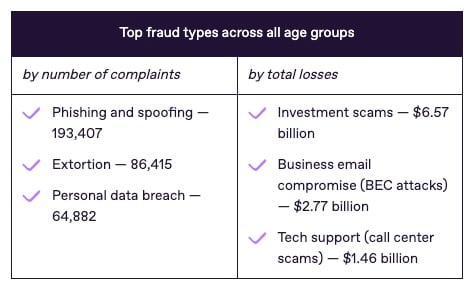
Source = Regula Forensics
With over 53 billion identity records now exposed online, businesses can no longer rely on low-security methods; implementing automated, AI-driven forensic verification is the only way to combat the surge in synthetic identities and deepfakes that bypassed traditional defenses last year.
In 2026, the complexity of these forgeries has reached a point where the human eye is easily tricked. Criminals use sophisticated software to swap faces, alter birth dates, and even fabricate entire security holograms.
If your verification process is not looking at the pixels and the hidden data behind the file, you are essentially leaving your front door unlocked.
Understanding the specific red flags and integrating high-level detection tools is the only way to protect your revenue and your reputation.
Let’s dive in.
Key Takeaways
- TruthScan identifies microscopic distortions in facial features and document backgrounds that manual reviewers consistently miss.
- Digital footprints such as hidden software tags and mismatched timestamps serve as the first line of defense against edited files.
- Enterprise security requires systems that can process thousands of IDs per second without sacrificing accuracy or increasing human fatigue.
- TruthScan provides confidence scores and heatmaps to help your team make informed decisions on high-risk identity claims.
What Are Indicators in an ID Image?
Indicators are the specific technical and visual anomalies that suggest a document is not original. When a legitimate ID is created, it follows a strict algorithmic pattern in its layout, font, and security features. Any deviation from this pattern acts as a signal for your verification team.
Signs of manipulation often appear in the form of inconsistent textures or lighting that does not match the environment.
For instance, if the person’s face is perfectly lit but the rest of the ID appears grainy or dark, that is a visual indicator of a photo swap.


Never Worry About AI Fraud Again. TruthScan Can Help You:
- Detect AI generated images, text, voice, and video.
- Avoid major AI driven fraud.
- Protect your most sensitive enterprise assets.
Suspicious visual inconsistencies can also include “halos” around the head or slight blurring where the background meets the jawline.
Furthermore, altered identity information focuses on the text itself. Fraudsters often use digital “erasers” to remove original names and expiration dates, leaving behind subtle pixel ghosting or font mismatches that indicate the document has been tampered with.
How Fraudsters Manipulate ID Images Today
The methods used to forge documents have shifted from physical alteration to digital creation. Criminals no longer need a printing press; they only need a subscription to an AI tool.
AI-Generated Identity Photos
Fraudsters now use tools to create faces that do not belong to real people. These “synthetic” faces are then placed onto real ID templates. Because the face is unique, it will not trigger traditional duplicate image searches.
However, these faces often have AI artifacts like mismatched earrings or irregular pupils that give them away.
Edited Document Elements
This is the most common form of fraud where a real document is modified. A fraudster might take a stolen driver’s license and change the address to match a stolen credit card.
They use high-end editing software to replicate fonts, but they often struggle to match the exact spacing and weight used by government printers.
Synthetic Biometric Overlays
Some advanced criminals use “masks” that are layered over a real person’s face during a live liveness check.
These overlays are designed to fool facial recognition systems by mimicking the movements of a human face while presenting a different identity.
How ID Fraud Has Evolved Over Time
Manual Editing Methods
Years ago, fake IDs were physical. They involved scraping off ink, using typewriters, or crude laminations. These were easy for a trained eye to spot under a UV light or through simple tactile inspection.
AI-Powered Manipulation Tools
The introduction of generative AI changed everything. Now, fraudsters use “deepfake” software to automate the creation of thousands of unique documents.
These tools can automatically adjust lighting and shadows to make a fake photo look like it was naturally part of the card.
Scalable Fraud Operations
Fraud is now an industry. Professional “fraud farms” use bots to submit hundreds of manipulated IDs to different platforms simultaneously.
They test which systems are weak and exploit them until they are caught, making scalable identity verification a mandatory requirement for global enterprises.
8 Indicators an ID Image Has Been Manipulated

Source = Cybernews
Spotting a fake document requires a systematic approach. You must look past the surface and analyze the document like a digital forensic expert.
Here are the eight primary indicators that a file has been tampered with.
1. Inconsistent Font Styles
Government agencies use highly specific, proprietary fonts. When a fraudster edits a name or a date of birth, they often use a font that looks similar but isn’t exact.
You might notice that the number “8” looks slightly different in the expiration date than it does in the ID number.
Example: A New York ID where the street address uses a sans-serif font while the rest of the document uses the official state-mandated serif font.
2. Altered Facial Features
This is a classic sign of a face swap. Look for misaligned eyes or a nose that doesn’t quite point the same way as the chin. AI-generated faces often have an “uncanny” look where the skin is too smooth and lacks natural pores or imperfections.
Example: An ID photo where the shadows on the person’s nose go to the left, but the shadows on their neck go to the right.
3. Irregular Document Edges
A real photo of a physical ID will have natural shadows and slightly rounded corners. A digitally created ID often has perfectly straight, razor-sharp edges that look like they were cut out with a digital tool.
Example: A passport scan where the edges are a perfect 90-degree angle with zero pixel blur, suggesting it was never a physical book.
4. Metadata Mismatches
Every digital photo has a “birth certificate” known as EXIF data. This data tells you the camera model and the time the photo was taken. If an ID photo claims to be from a smartphone but the metadata lists “Adobe Photoshop” as the source, it is a fraud.
Example: A submission where the ID was supposedly issued in 2022, but the image creation date in the file data is from 2026.
5. Low-Quality Image Areas
Fraudsters often save and re-save images, which causes “compression artifacts.” You might see pixelated boxes around the name or the face, while the rest of the card looks clear. This suggests those specific areas were edited and flattened.
Example: A clear image of a driver’s license where the birthdate is surrounded by a blurry, “noisy” rectangle.
6. Mismatched Lighting Conditions
Legitimate ID photos are taken in controlled environments. If the face looks like it was photographed in a dark room but the background of the ID is bright white, it indicates the photo was pasted in from another source.
Example: Reflections in the subject’s glasses that show a window or a room that doesn’t match the studio setting of a DMV.
7. Suspicious Background Artifacts
When a fraudster removes a face from a card, they have to “fill in” the background.
This often leaves behind “cloned” patterns or weird smudge marks where the digital brush didn’t perfectly match the original security print.
Example: A wavy security pattern on the background that suddenly breaks or looks mirrored behind the person’s head.
8. Synthetic Identity Elements
AI-generated faces struggle with symmetry. Look at the ears or the way hair meets the forehead. If one ear is higher than the other or the hair looks like it was painted on with a soft brush, you are likely looking at a synthetic identity.
Example: An ID photo where the person has a stray lock of hair that disappears into their forehead or appears to float.
How Enterprises Detect Manipulated ID Images
Large organizations cannot rely on manual review to catch these subtle errors. They must use a combination of automated tools to build a wall of defense against professional fraudsters.
| Analysis Type | What It Detects | Why It Matters |
| Authenticity Analysis | Scans for pixel distortions and AI “noise” signatures. | Catches deepfakes that look perfect to the human eye. |
| Biometric Verification | Compares the ID photo to a live selfie of the user. | Ensures the person holding the ID is the owner. |
| Metadata Forensics | Checks the internal file data for editing software tags. | Identifies if a document was modified in Photoshop. |
| Cross-Platform Checks | Looks for the same ID being used on other platforms. | Stops fraud rings from recycling the same fake ID. |
A real case recently highlighted by Interpol’s latest financial crime report involved a ring that used one “master” AI face to create 400 different identities. Only through metadata and cross-platform checks was the ring finally dismantled.
Best Practices for Preventing ID Fraud
- Multi-Layer Verification Workflows Do not rely on just one check. Combine document analysis with liveness detection and database verification to ensure the person exists in government records.
- Real-Time Fraud Monitoring Watch for patterns like multiple accounts being opened from the same IP address or the same device fingerprint. This often signals a bot-driven attack.
- Employee Fraud Awareness Train your staff to recognize the latest deepfake trends. Even with AI tools, a human reviewer should be the final judge for high-value or high-risk accounts.
- Continuous Compliance Audits Regularly review your fraud rates and update your KYC and AML compliance protocols to meet new regulatory standards for 2026.
AI Tools Used to Identify Fake IDs
To combat the industrial scale of modern forgery, enterprises must move beyond simple visual inspections.
In 2026, the technology used to detect fake id images has become highly specialized, focusing on microscopic details that are invisible to the naked eye but mathematically obvious to a trained algorithm.
AI Image Detector: Spot Altered Images
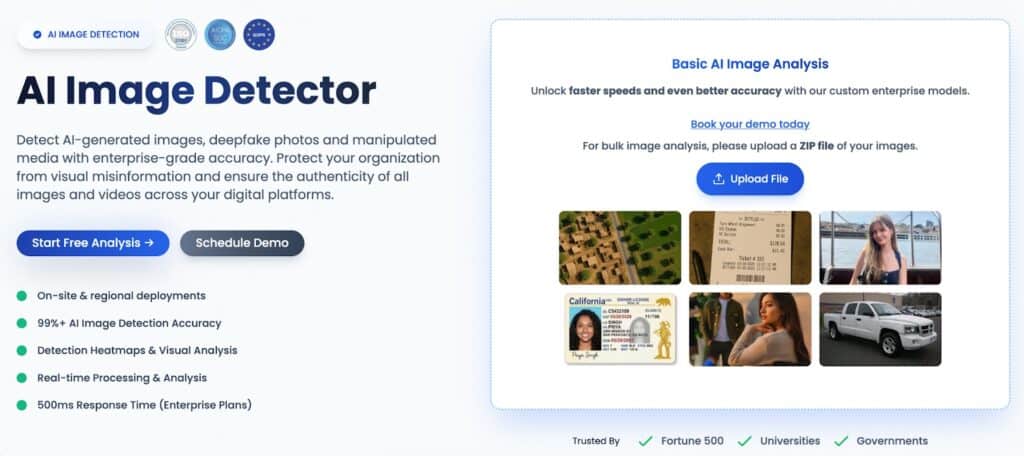
Our AI Image Detector acts as a forensic scientist for every file uploaded to your platform. It doesn’t just read the text; it analyzes the underlying structure of the image to find signs of tampering.
This tool is specifically designed to identify where a fraudster has used a digital “eraser” to remove a name or birthdate and replaced it with a new one.
By examining the pixel-level inconsistencies in edited documents, the system can flag “noise” patterns that occur when two different images are blended together.
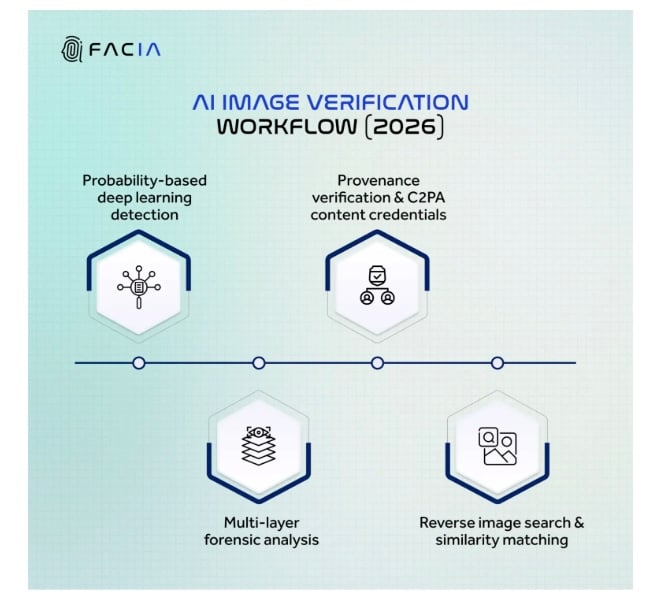
Source = Facia
This ensures that even high-fidelity edits made in professional design software are caught before they can bypass your onboarding gate.
Deepfake Detector: Detect Synthetic Faces
As generative AI becomes more advanced, “face-swapping” has become a common tactic for bypassing biometric checks.
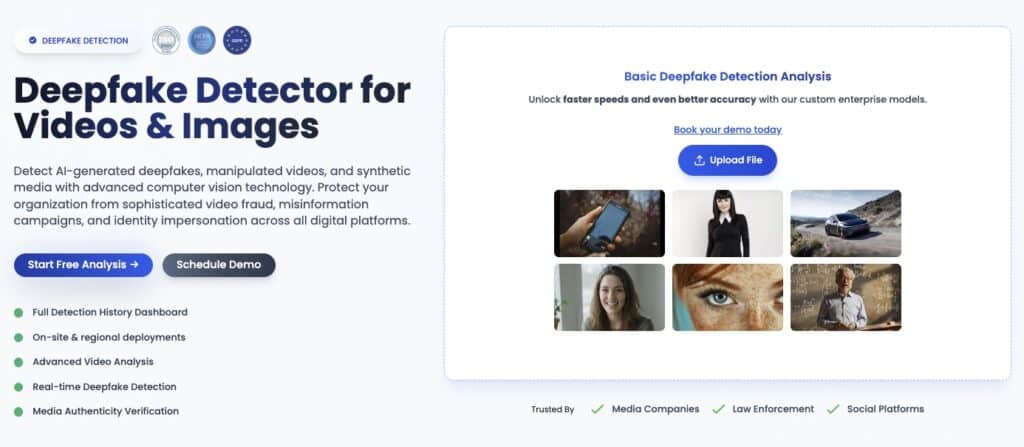
Our Deepfake Detector focuses entirely on the facial region of the ID, scanning for biological signals and cross-media patterns that reveal a synthetic origin. It looks for “GAN artifacts”—tiny mathematical errors left behind by the AI models used to create the fake face.
Whether it is an unnatural skin texture or a mismatched reflection in the eyes, this tool ensures that the likeness on the card belongs to a real human being rather than a machine-generated persona.
Pattern Anomaly Recognition
Pattern anomaly recognition, also known as outlier detection, serves as the global brain of your fraud prevention system.
Instead of looking at a single document in isolation, it compares the submitted ID against millions of known legitimate templates and historical fraud data.
According to recent guides on detecting AI-generated fake IDs, this technology maps statistically unusual characteristic combinations—such as a specific font weight being paired with an incorrect holographic placement for a certain state.
By identifying these “outliers,” the system can flag a document that looks perfect on the surface but fails the mathematical test of how a real ID should be constructed.
How TruthScan Strengthens Identity Verification
TruthScan provides an enterprise-scale ID analysis platform that removes the guesswork from your onboarding process.
By using automated fraud detection, TruthScan can scan thousands of documents per minute, identifying pixel-level edits and metadata anomalies that manual reviewers would miss.
The system provides real-time verification alerts, giving your team immediate feedback on whether a submission is authentic or a dangerous forgery. This allows you to scale your business safely without having to hire a massive team of manual investigators.
TruthScan’s technology looks at the mathematical structure of every image to ensure it was captured by a real camera and hasn’t been touched by generative AI.
Talk to TruthScan About Preventing ID Image Fraud
Protecting your business from professional fraudsters requires a proactive approach. TruthScan is designed to protect onboarding workflows by acting as a high-tech filter for every new application.
Our platform helps you reduce identity fraud by catching the subtle signs of manipulation before the fraudster can gain access to your systems.
By utilizing TruthScan, you can secure customer verification and maintain the trust of your legitimate users, ensuring that your platform remains a safe place for business.
Explore TruthScan to see how forensic AI can transform your identity verification from a vulnerability into a strength.